What is the Outlook Calendar and how do I use it?
The Outlook Calendar is the scheduling tool built into Microsoft Outlook. It lets you manage appointments, set reminders, book meetings, and coordinate schedules with others—all integrated alongside your email and contacts.
You can use the Outlook Calendar to:
- Create personal appointments and all-day events
- Organize and send meeting invites with RSVP tracking
- Use Scheduling Assistant to find available times with others
- View multiple calendars side-by-side or overlaid
- Set recurring events, categories, and reminders
- Share your calendar or manage permissions for others
How do I get started with the Outlook Calendar?
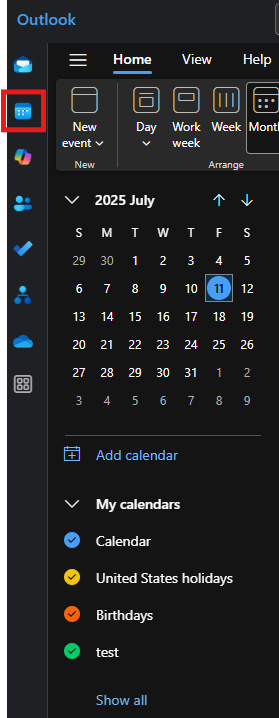
To create a calendar item, open the Calendar view in Outlook and click New Appointment or New Meeting. Add a title, location, time, and any invitees if it’s a meeting. Click Send to distribute a meeting or Save & Close for a personal event.
Use the view options in the toolbar (Day, Work Week, Week, or Month) to manage how your schedule appears. You can also toggle calendars in the left-hand pane to view shared or additional calendars.
Where can I find more detailed instructions?
Microsoft provides a full guide with the most up-to-date steps and visuals here: Introduction to the Outlook Calendar